
WDM: An Open-Source Download Manager for Windows
A free MIT-licensed multi-connection download manager for Windows with crash-safe resume, queues, a scheduler and confirm-first browser integration.
- Client
- Personal open-source project
- Role
- Designer and developer
- Timeline
- Oct 2026 — Oct 2026
- Stack
- .NET 10, WPF, C# +4
Case study
Challenge & Solution
The problem
Windows downloads still fail in the same ways: a dropped connection restarts a multi-gigabyte file, a browser’s single stream is slower than the link, and download managers are either closed source, bundled with ads or collect data quietly. I wanted a download manager that is fast, resumes reliably and is open enough to read.
What I built
WDM is a free, MIT-licensed multi-connection download manager for Windows, built on .NET 10 and WPF with Chrome, Edge, Brave and Firefox integration. The source is on GitHub.
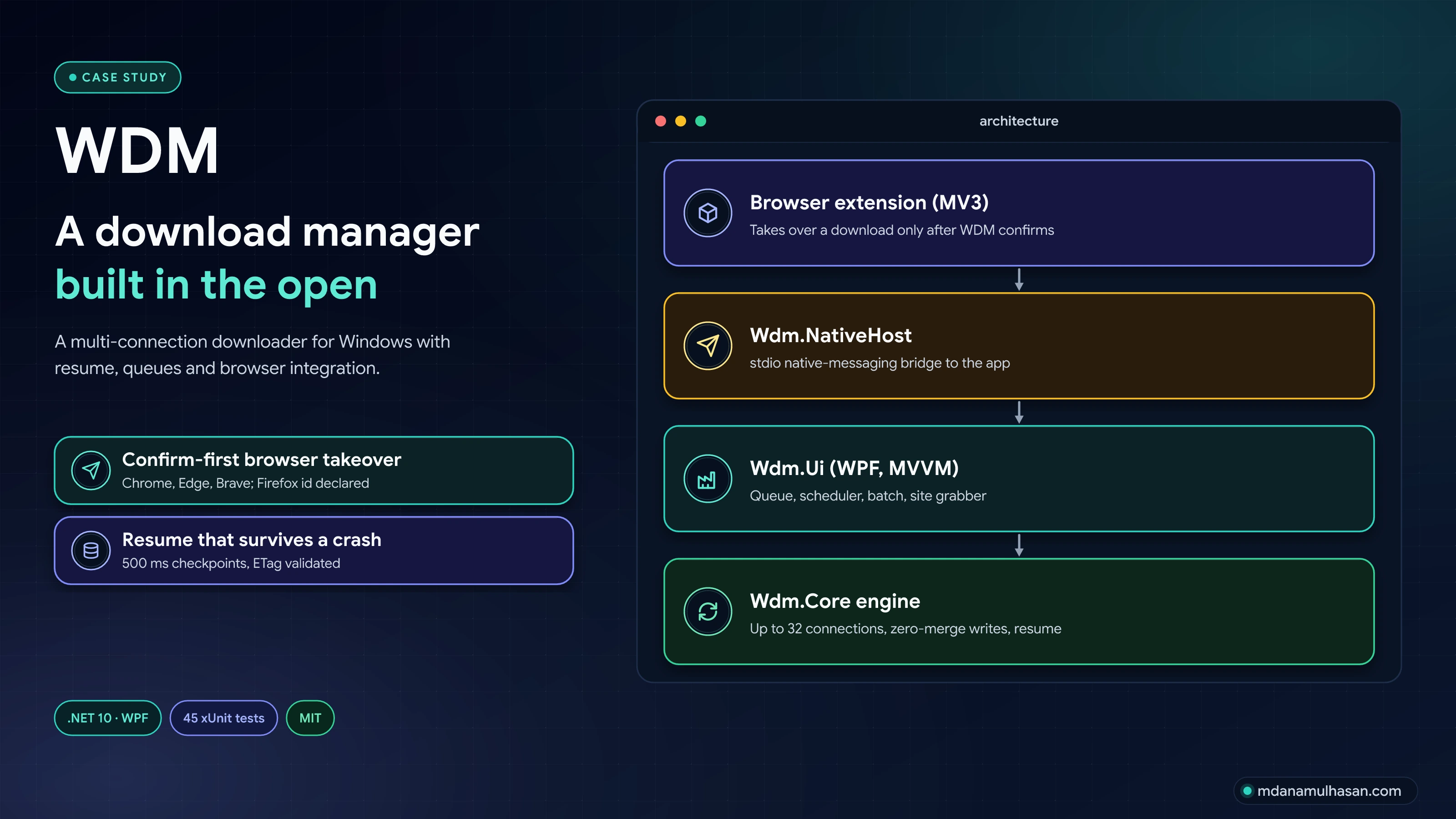
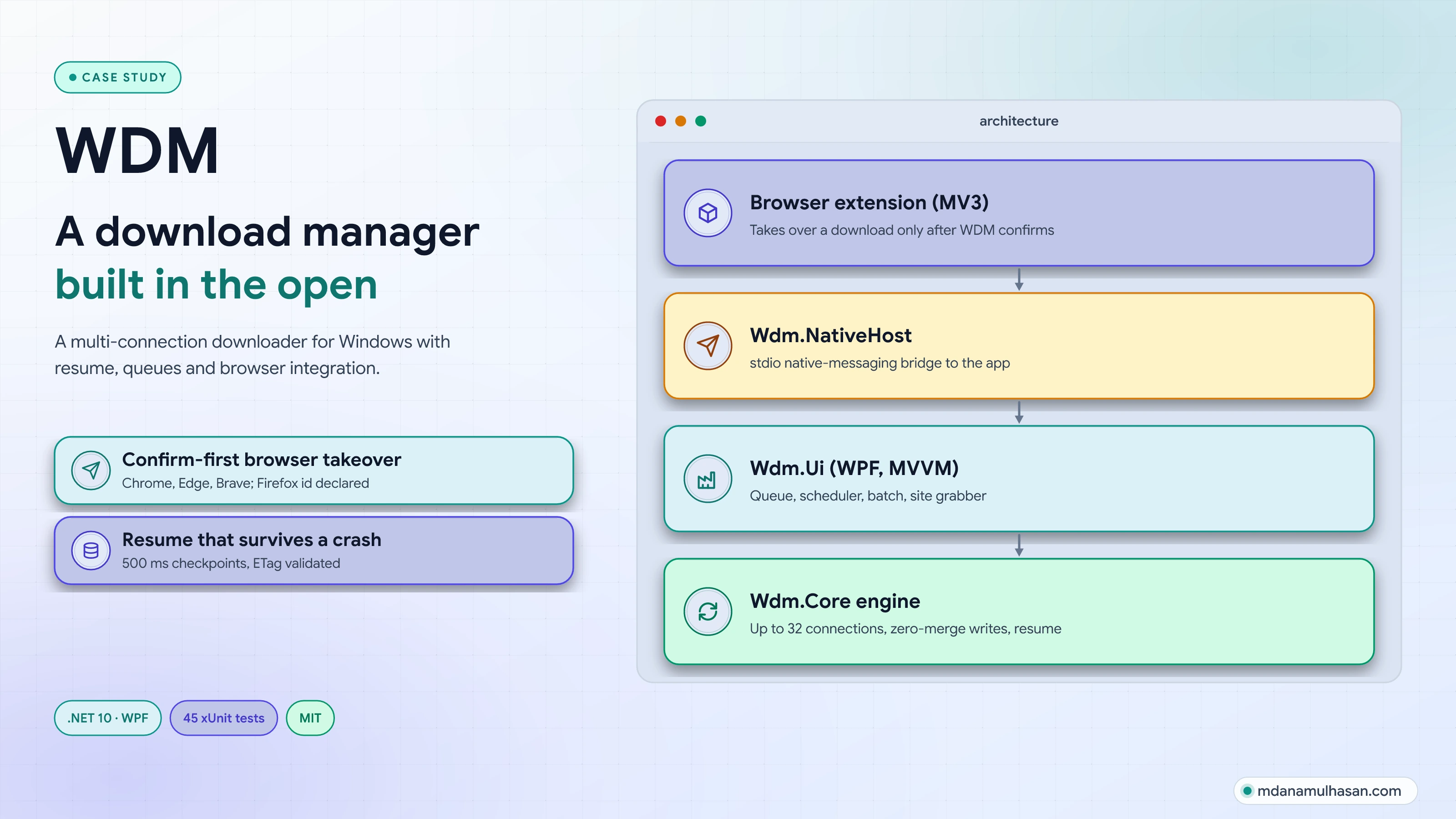
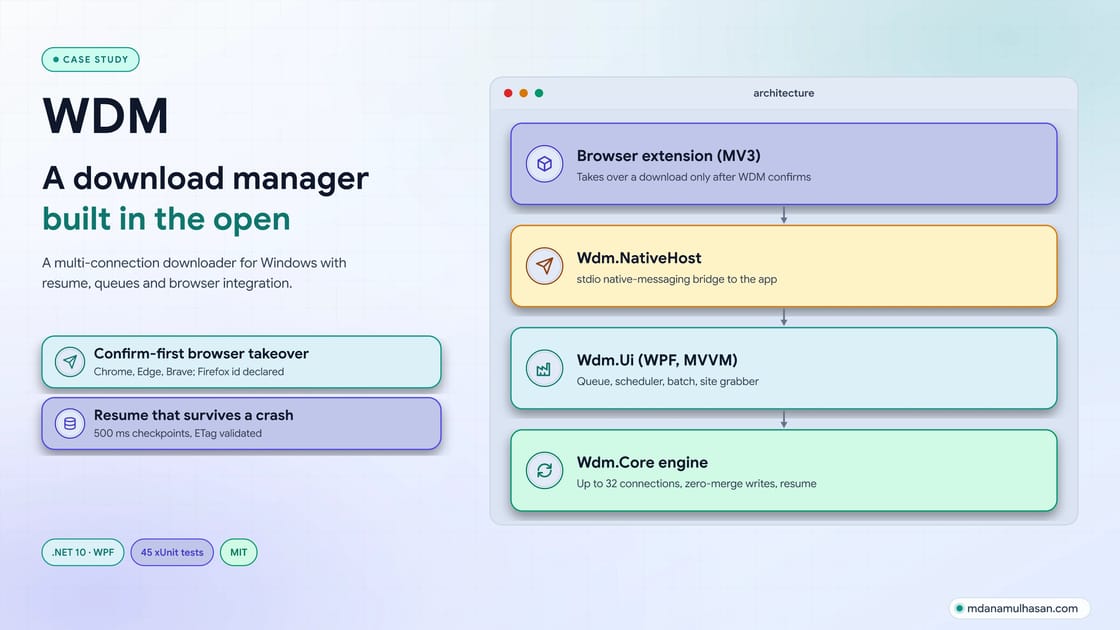
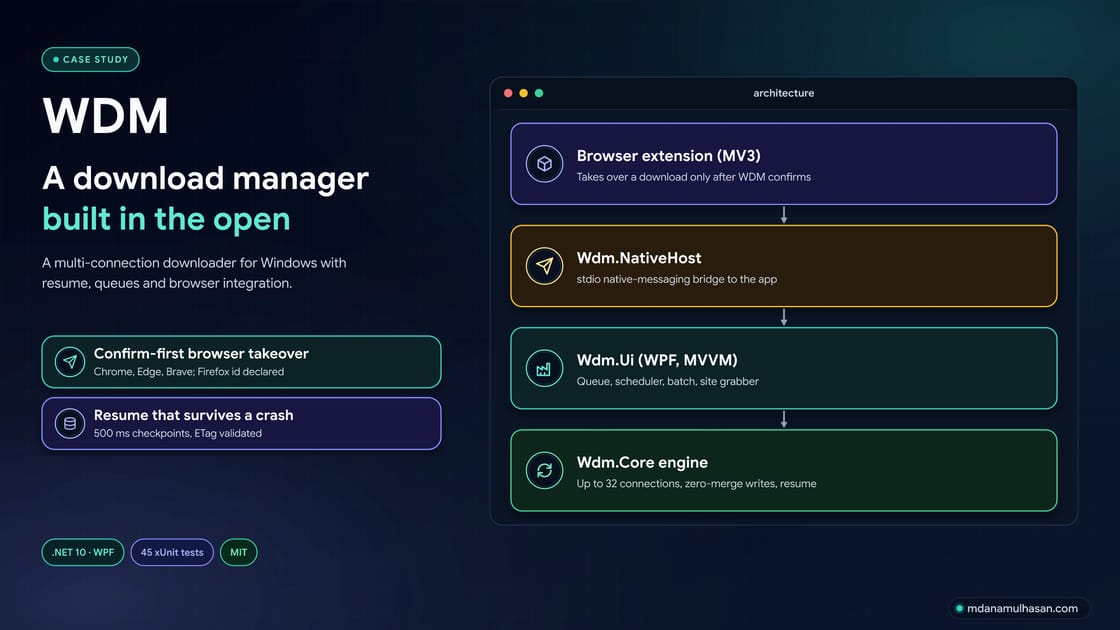
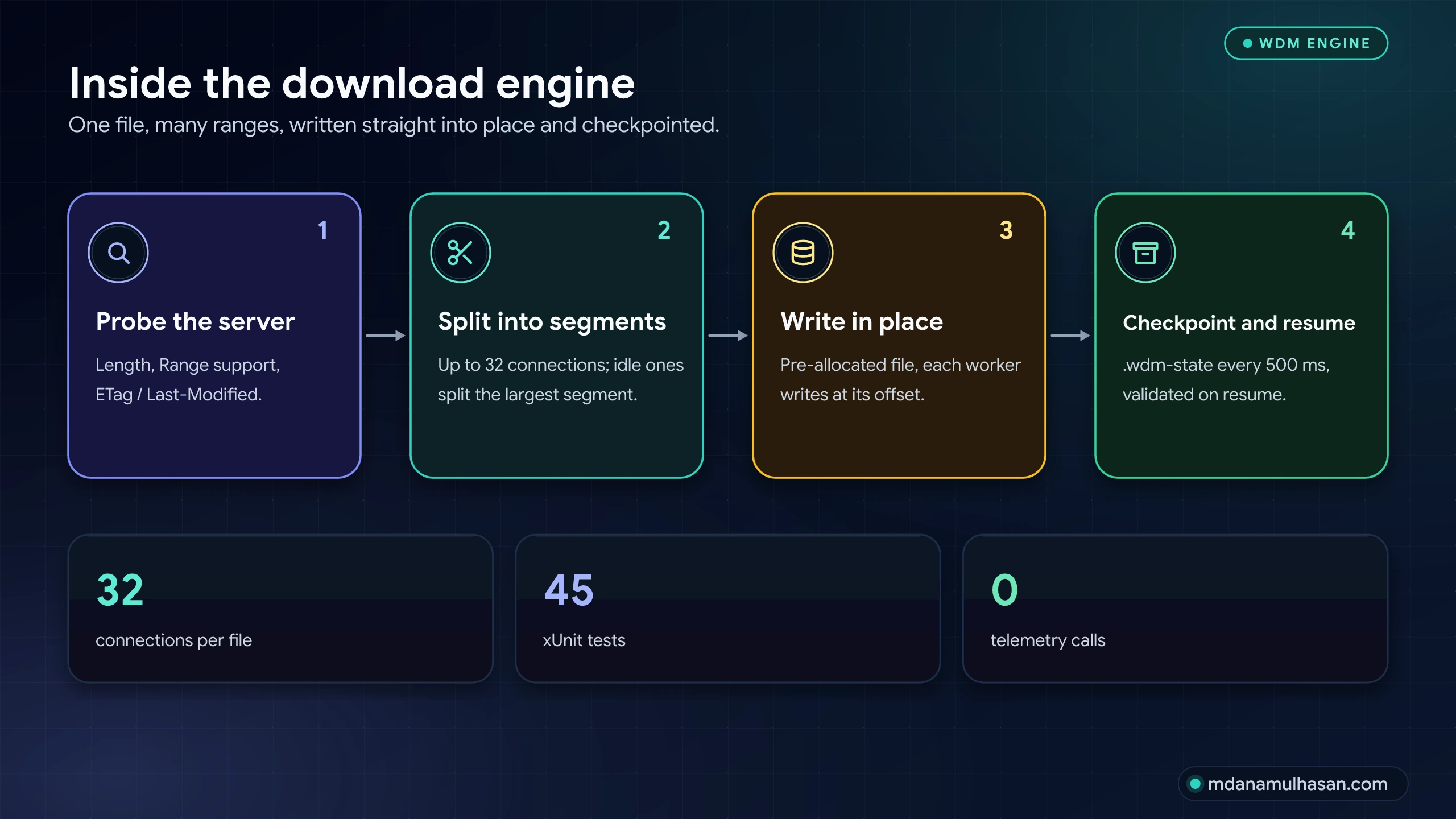
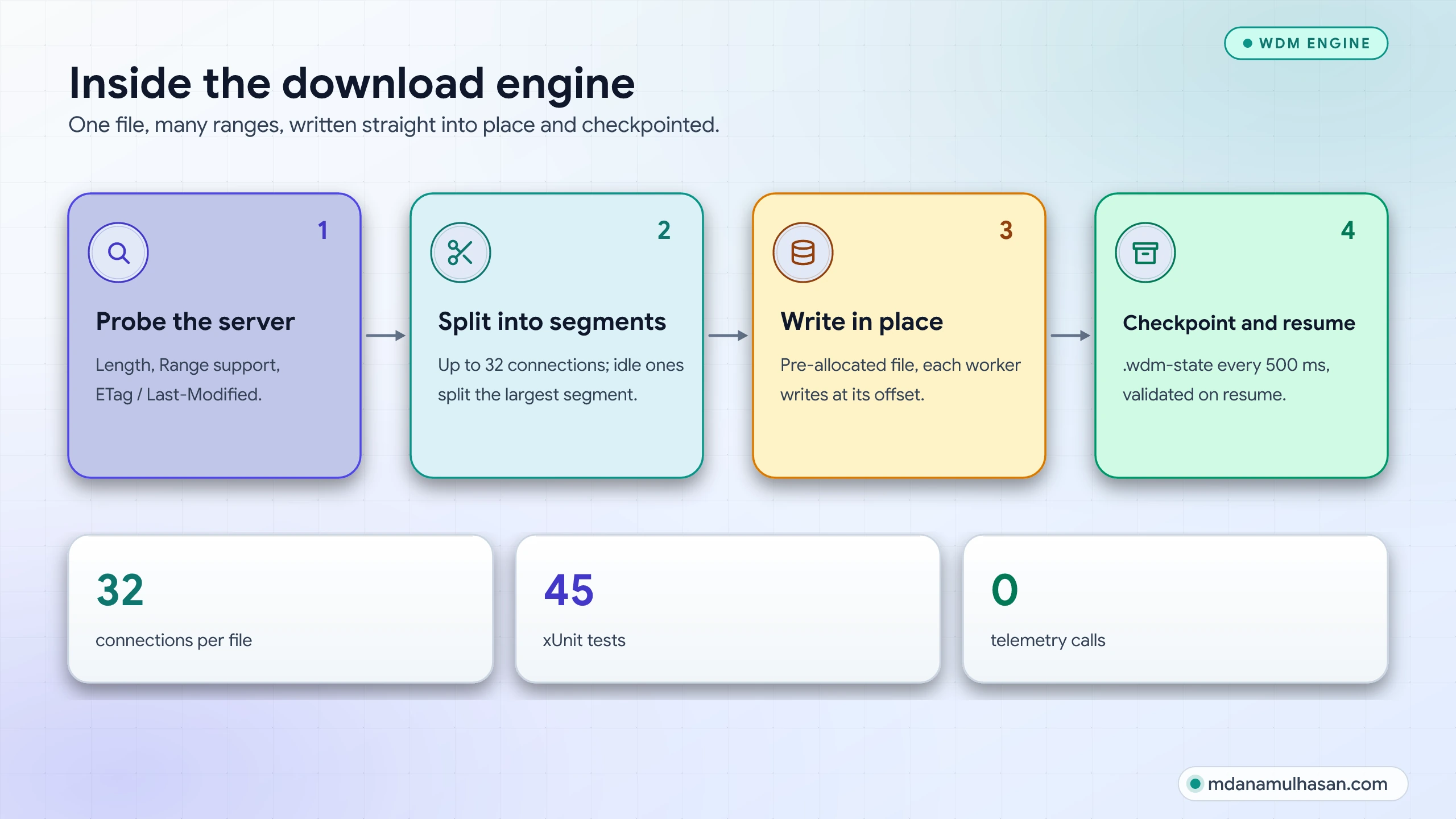
- Multi-connection engine: up to 32 connections per file; an idle connection splits the largest active segment.
- Queue and scheduler: start and stop times, 30-second automatic retry of failed items, optional shutdown when the queue finishes.
- Browser takeover that asks first: the extension takes over a download only after WDM confirms; otherwise the browser download continues untouched.
- Batch download, site grabber and clipboard sniffer, one shared speed limiter, and a standalone
Wdm.Cliterminal downloader.
How the engine works
Design decisions
| Decision | Why |
|---|---|
| Zero-merge writes | Each worker writes directly into its offset of a pre-allocated file, so there is no merge step and no second disk pass at the end. |
| Checkpoint every 500 ms | A .wdm-state file is validated against ETag and Last-Modified on resume, so a crash or a changed file never produces silent corruption. |
| Verify ranges | A server that ignores Range fails the segment instead of writing the wrong bytes. |
| Scope credentials | Cookies go only to the host they were captured for and credentials only to the original host, never across a redirect to another host or an https to http downgrade. |
| Confirm-first takeover | The extension never silently steals a browser download. Site access is optional and granted from the popup, which also avoids a broad-host-permissions review. |
| No telemetry | No analytics and no background network calls. |
Result
- v1.0.0 and v1.0.1 released on 2026-10-21, two days after the first commit. v1.0.1 added Chrome Web Store packaging and an extension with no standing host access.
- 45 xUnit tests cover segmentation, storage and resume, end-to-end and unknown-length downloads, the speed limiter, file-name handling, cookie and credential scoping, IPC and settings.
- Self-contained installer (no separate .NET install) with SHA-256 checksums, and a release workflow set up for SignPath code signing. The first two releases are unsigned, so Windows SmartScreen may warn.
Limits
No tray icon, proxy settings or per-site logins UI yet; the takeover file-type list is fixed in the extension; Firefox support is declared but not yet verified. They are listed openly in the repository README.
Links
- Download and screenshots: WDM resource page
- Source and releases: WDM source code on GitHub
- Need a Windows or CAD desktop tool built? Get in touch.
Measurable Impact
Key Outcomes & Performance
Quantified business outcomes and engineering improvements delivered.
Connections per file
Idle connections split the largest segment
Automated tests
xUnit, including end-to-end downloads
Telemetry
No analytics or background calls
Visual Documentation
Project Gallery & Technical Visuals
High-precision 3D CAD renders, exploded assemblies, and fabrication documentation.
Process & Milestones
Engineering & Development Journey
From initial requirements gathering to precision modeling and manufacturing validation.
Engine first
CoreSegmentation, zero-merge writes and checkpointed resume with a test suite.
Windows app
AppWPF queue, scheduler, batch dialog, site grabber and speed limiter.
Browser integration
IntegrationMV3 extension and native-messaging host with confirm-first takeover.
Release
2026-10-21v1.0.0 and v1.0.1 with installer and checksums.
Technical Stack